
role
Product Designer
scopes
B2B SaaS
Banking Tech
Product Design
collaborators
1 Product Manager
1 Product Designer
Engineer Team
timeline
Q1 - Q2 2024
Background
Back in mid-2023, the Supply Chain Financing (SCF) portal was first established for Seabank Indonesia. SCF was initiated by the business credit team in partnership with corporate clients and SMEs (small and medium enterprises) to enable invoicing demand loan services in our bank.
In early 2024, there was a business requirement to expand the outstanding loan from IDR 1.X trillion to IDR 4.X trillion*. At the time, only Principals were allowed to submit loan requests in the existing system. To support this expansion, it was necessary to grant Suppliers access to loan request submissions.
This brought 2 main scopes to enhance the SCF portals for both Internal portal (used by Seabank Ops) and External portal (used by Principals & Suppliers):
Bulk invoice support: Speed up submissions by uploading and selecting bulk invoices, thus generating multiple loan requests at once.
discovery
Goals
Each stakeholder has their respective problem statements and goals:
Constraints
Proposed Solutions
On the SCF portals:
On the project management constraints, I facilitated cross-department discussions with product managers from current ongoing projects. We came to these agreements:
exploration
New Page: "Invoices"
SCF portals are comprised of 2 portals: External & Internal. For both portals, we added a new page: Invoices.
Principals & Suppliers with Submitter role can store, upload, and manage their invoices on the External portal. Principal Checker, Approver, has view access on the External Portal, as well as Seabank Ops on the Internal portal.

User flow for uploading new invoices on the Invoices page (Submitter role only)
In this new page, Principal Submitter and Supplier Submitter have access to New invoices button. This will open a side drawer for creating a new invoice. All roles are able to see a table of uploaded invoices with search and filter function. The new Invoices page is accessible via sidebar menu.

Sidebar menu comparison: Before & after the addition of "Invoices"

"New invoice" side drawer
Figma prototype on creating a new invoice
Adding Invoices in Loan Request Submission

User flow for adding & multi-selecting invoices
This is where a Principal Submitter or a Supplier Submitter create new loan requests and add invoices. Instead of showing a single invoice field, now we show multiple expandable invoice fields for the selected invoices.
To select invoices in the first place, users click Add invoices button, which will open a side drawer that shows all previously created invoices. Submitters can search and multi-select the existing invoices.
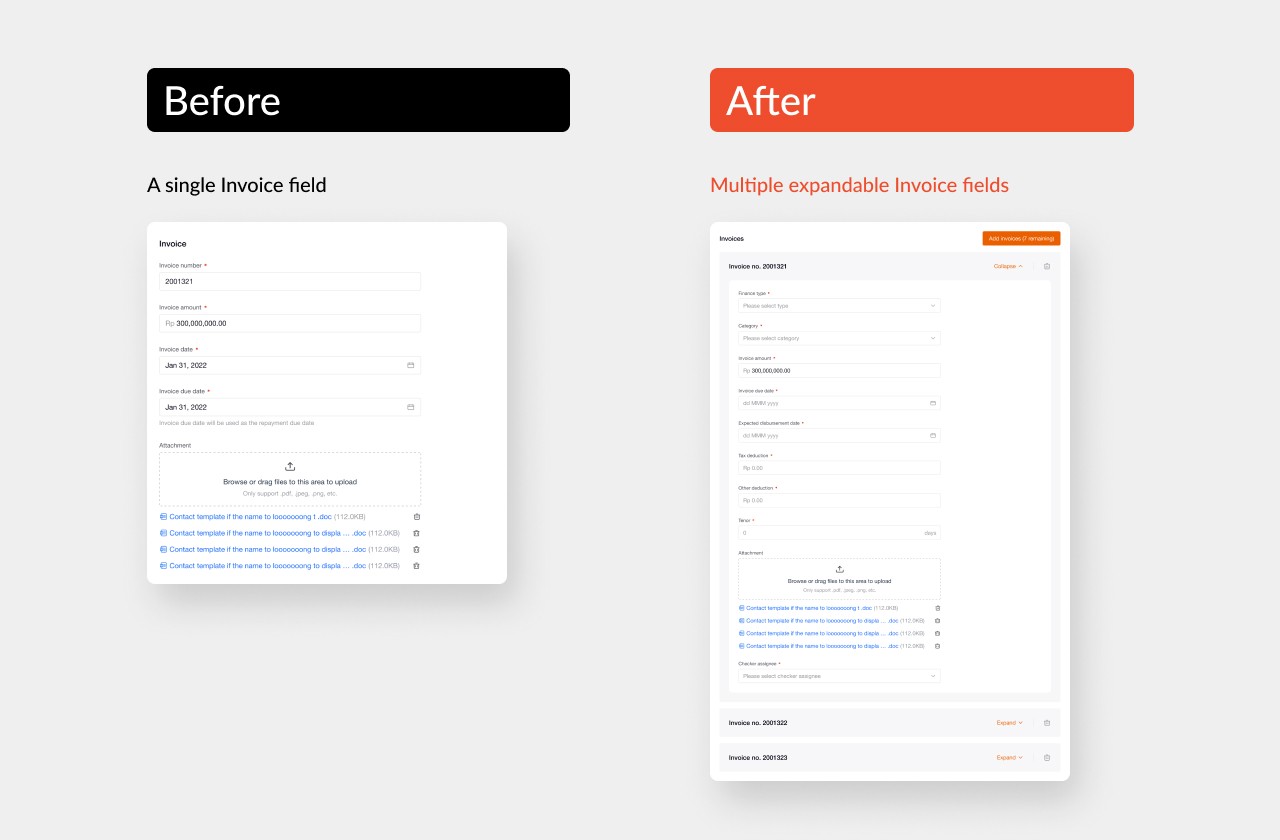
Invoice field comparison: Before & after multiple expandable fields

"Add invoices" side drawer
iteration
Invoice Creation From the Side Drawer
After further feedback from the business team, for ad-hoc purposes, we also enable creating new invoices from the side drawer. Clicking New invoice button will open the previously mentioned "New invoices" drawer atop the "Add invoices" drawer.
This way, users can focus on the invoice creation without being distracted by the invoice selection.
Once the new invoice is created, the "Add invoices" drawer returns to view once more, and user can continue the invoice selection.
Figma prototype on creating new invoice from "Add invoices" side drawer
evaluation
Impact and Performance
key takeaways
User-centered design drives measurable business impact.
Adding the ability to create invoices directly from the selection drawer, based on business team feedback, demonstrates how small design iterations based on real-world usage patterns can significantly improve workflow efficiency.
Cross-functional alignment unlocks scalable solutions.
Working with limited resources and tight timelines required strategic prioritization and resource allocation. By agreeing on phased implementation, the team delivered a complex multi-portal enhancement without compromising quality or other high-priority projects.